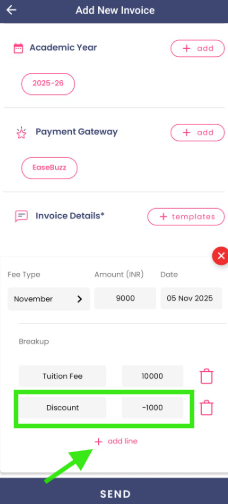
How to add a discount to the fee invoice for a specific child?
- Go to the Fee Invoices module.
- Tap the ‘+’ button.
- Select the child and then choose the fee template you want to use.
- If the invoice already has a breakup, tap Add Line, go to Fee Details, select Discount as the Fee Type, and enter the discount amount with a ‘–’ (negative) sign.
If the invoice doesn’t have a breakup, tap Add Breakup, add the same fee head in the first row and enter the total amount.
Then, in the second row, select Discount as the Fee Type, click on done and then enter the discount amount with a ‘–’ (negative) sign.
The system automatically calculates and deducts the discount amount from the total invoice value.
Review the template carefully and send the invoice.
💡 Note: If you don’t find Discount listed in the fee types, tap the ‘+’ button and create the new fee type instantly.