How to Manage Reminder Settings in Kriyo?
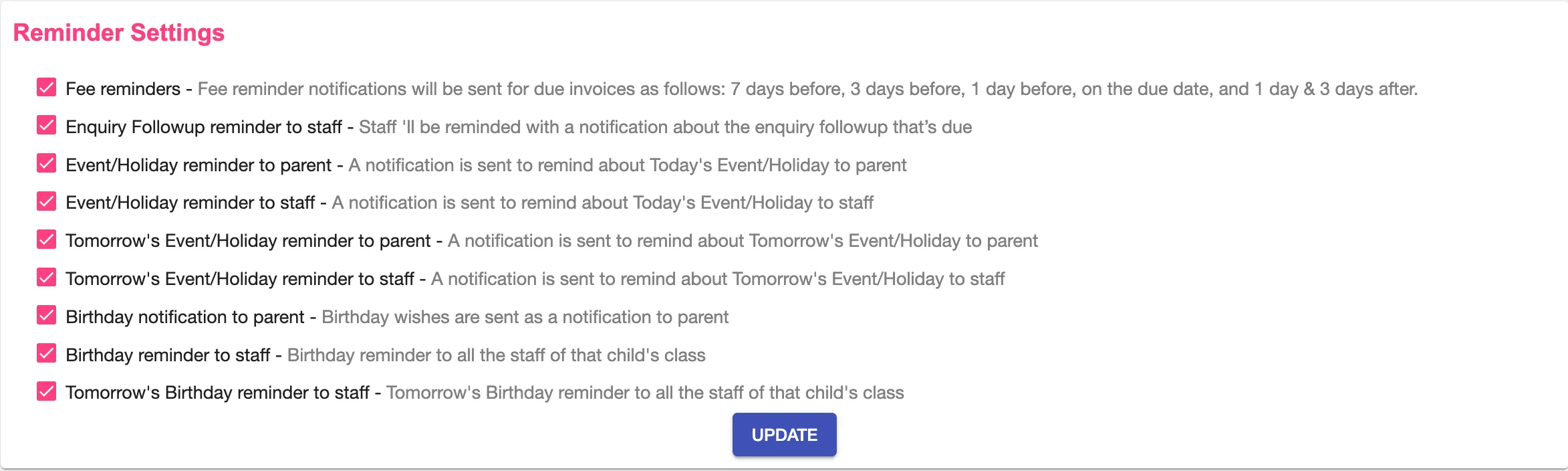
Reminder Settings allow schools to control which automated notifications are sent to parents and staff. All reminder options are enabled by default and can be turned on or off as needed.
Steps to Update Reminder Settings
- Log in to Kriyo Web
- Go to Admin Tools → Configurations → Reminder Settings
- Review the available reminder options, such as:
- Fee payment reminders
- Enquiry follow-up reminders to staff
- Event and holiday reminders (today and tomorrow)
- Birthday notifications for parents and staff
- Check or uncheck the reminders you want to enable or disable
- Click Update to save your changes
The updated settings apply to all future reminder notifications.
When Schools Commonly Adjust Reminder Settings
- Turn off automated birthday wishes to send personalised messages instead
- Disable certain reminders during vacations or special periods
- Reduce notification overload for parents or staff
This flexibility helps schools balance automation with personal communication.