How to use the Potty feature in Kriyo?
The Potty feature in Kriyo allows teachers and caregivers to record diaper changes and potty breaks for children quickly and share updates instantly with parents.
It helps maintain hygiene, supports healthy routines, and gives parents peace of mind knowing their little one is well cared for.
Sending a Potty or Diaper Update
1. Open the Potty Feature
- On the home screen, tap See All Features.
- Under the Activities section, select Potty.
💡 Tip: You can add Potty to your favourite features for quick access if you use it often. See article: How to Customize Your Favorite Features.
2. Select Children
- Choose one or multiple children for whom you want to send the same update.
- If all selected children had their diapers changed at the same time, you can record the update together.
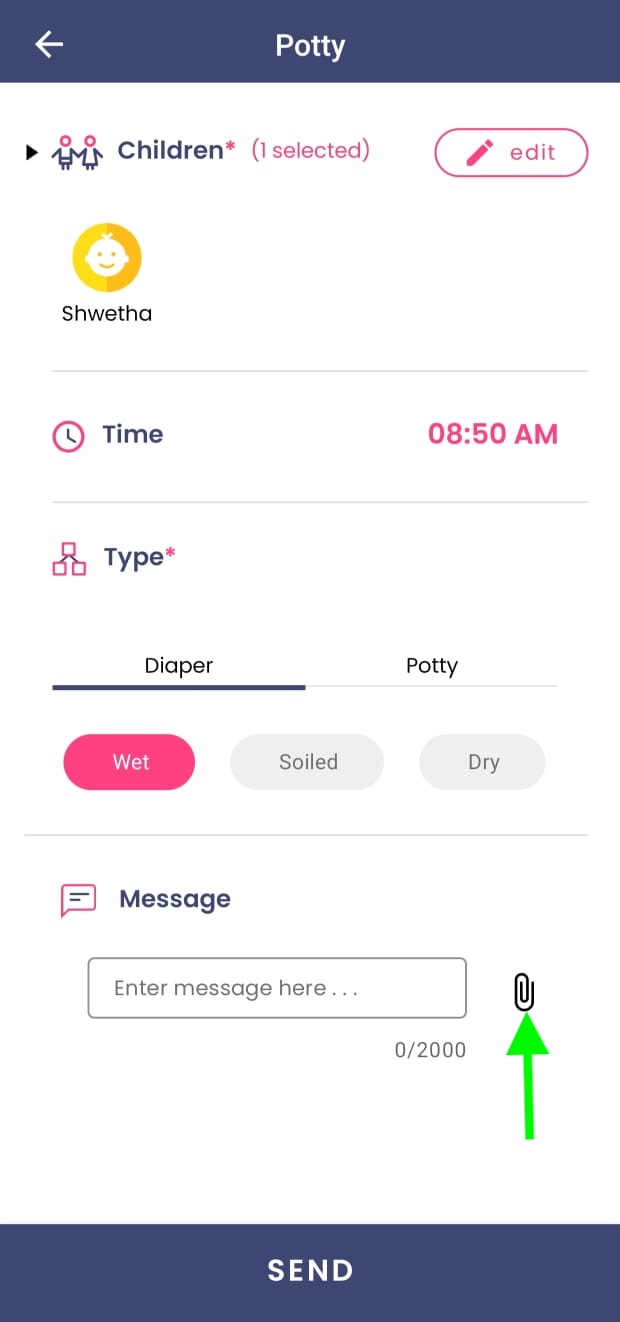
3. Select the Time
- The app automatically picks the current time.
- If you’re logging an earlier activity, change the time to reflect when it actually occurred.
4. Choose the Type of Update
- You’ll see two main options: Diaper and Potty.
- Under Diaper, select one of the following:
- Wet Diaper
- Soiled Diaper
- Dry Diaper
- Under Potty, select either:
- Pee
- Poo
5. Add Notes or Attachments (Optional)
- Add specific details if required — for example, “Changed after lunch” or “Dry diaper during nap time.”
- You can also attach a photo, voice message, or document, especially if there’s something unusual to report to parents or doctors.
6. Send the Update
- Tap Send.
- The parent will instantly receive a personalized message based on your selections (e.g., “Riya’s Wet Diaper was changed | 10 AM”)
Pro Tip:
Encourage staff to log every diaper change or potty break — even when everything is normal.
Consistent updates help identify patterns and give parents valuable insight into their child’s comfort and well-being.