How to use SMS and Email in Kriyo for reliable school communication
The SMS / Email feature in Kriyo helps schools send important communication through additional channels—SMS or email —alongside in-app communication. This is especially useful when schools want to ensure messages reach parents or staff reliably, without depending on external bulk messaging or email tools.
This product guide explains how to use the SMS / Email feature step by step, and what to keep in mind while using it.
Where to Find SMS / Email in Kriyo
The SMS / Email feature is available only on the Kriyo mobile app.
To access it:
- Open the Kriyo mobile app
- Tap on the SMS / Email option
This will open a selection screen to begin your communication.
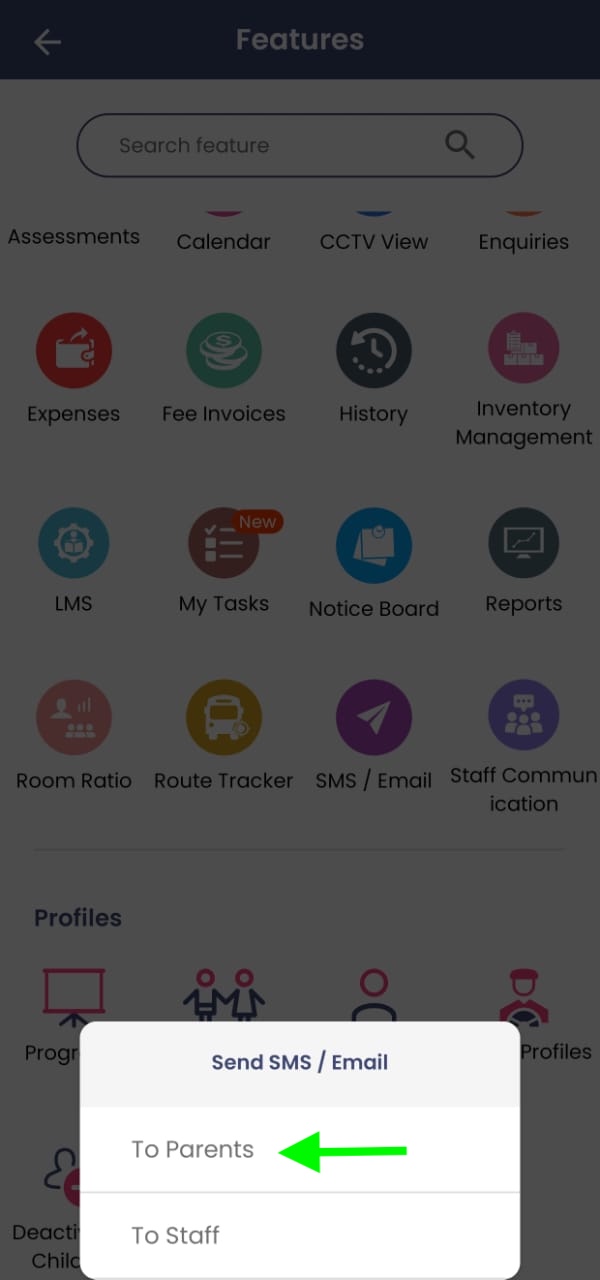
Choosing the Recipients
After tapping SMS / Email:
- Choose whether you want to send the message to Parents or Staff
- Select one or multiple recipients
- Tap Done to proceed
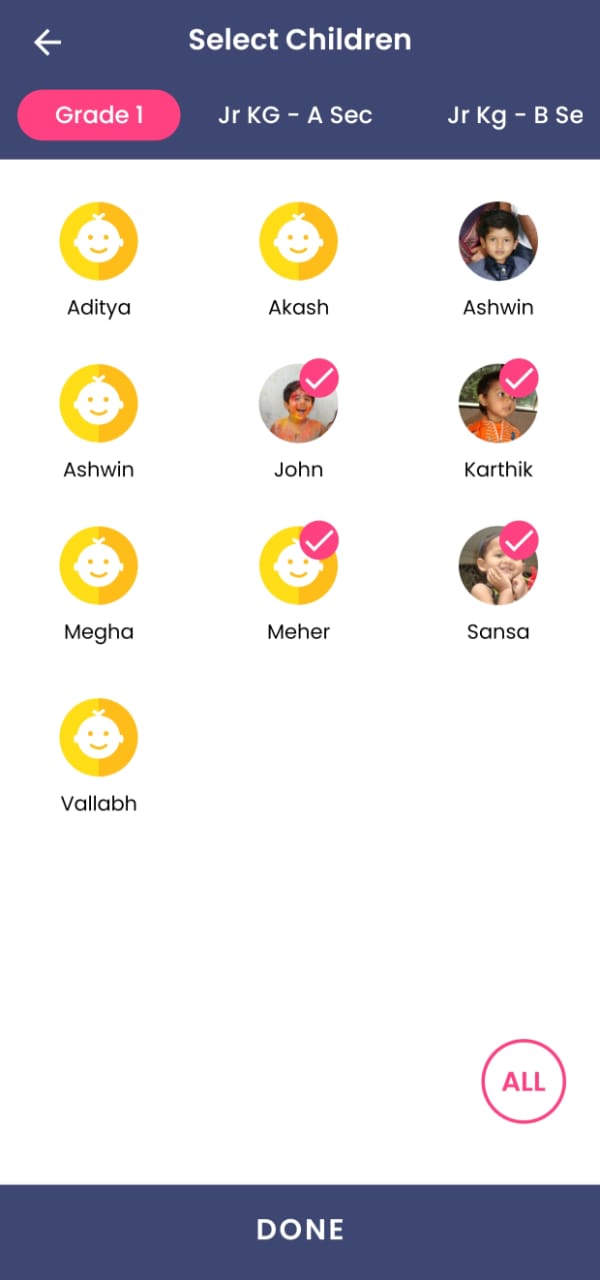
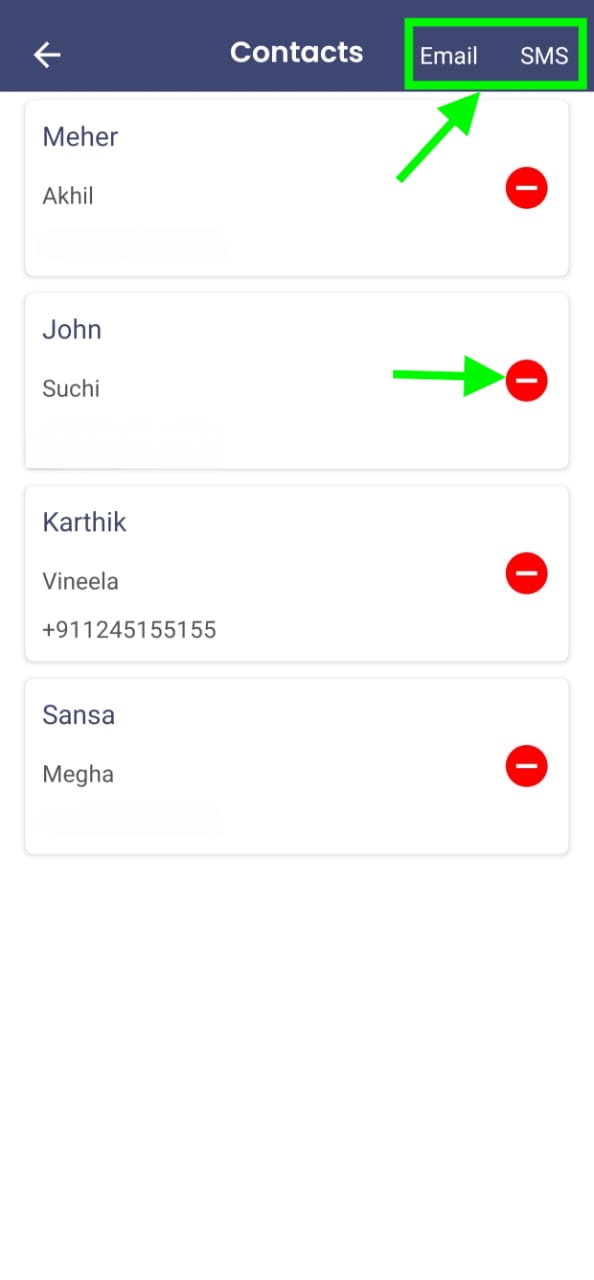
All phone numbers and email IDs are automatically picked from the parent or staff profiles already available in Kriyo—there is no need to manually copy or upload contact details.
You can also remove any selected recipient using the red minus (–) button before sending.
Sending an Email from Kriyo
To send an email:
- On the next screen, select Email from the top-right corner
- A pop-up will appear showing the email apps available on your device
- Choose the preferred email app
- The email compose screen will open with:
- Recipient email IDs auto-filled (picked from Kriyo profiles)
- Subject and message body ready to be typed
- Enter the subject and message content
- Tap Send
The email is sent directly from the email ID configured on your mobile device, making it familiar and recognizable for parents—and improving delivery reliability.
Sending an SMS from Kriyo
To send an SMS:
- Select SMS from the top-right corner
- A pop-up will display messaging options available on your device
- Choose the Messages (SMS) option
- The SMS compose screen opens with all selected phone numbers added
- Type your message and send
SMS messages are sent using the SIM card associated with your mobile device. This avoids the need for:
- Third-party SMS vendors
- Template approvals
- Bulk SMS packages
As a result, delivery rates are typically higher and faster.
Using WhatsApp (Important to Know)
If you choose WhatsApp from the messaging options:
- WhatsApp allows sending a message only to one contact at a time
- If multiple recipients are selected, WhatsApp will show an error
- If only one recipient is selected, WhatsApp will work as expected
This behaviour is controlled by WhatsApp and not by Kriyo.
Why SMS / Email Works as a Backup Communication Channel
Schools often rely on in-app communication, but there are situations where:
- Parents may miss app notifications
- Urgent messages need guaranteed visibility
- Additional reassurance is required
Kriyo’s SMS / Email feature helps schools send the same message through reliable, device-native channels, without investing in or managing external tools.
Best Practices for Using SMS / Email in Kriyo
- Use SMS or Email for important or time-sensitive updates
- Keep messages concise and clear
- Double-check recipients before sending
- Use in-app communication as the primary channel, and SMS / Email as a backup