Student & Staff Attendance FAQs: QR Check-In
Quick answers to 11 common questions. Pick a question to jump to its answer.
What is QR Check-In in Kriyo?
QR Check-In is a contactless way to record attendance for both students and staff
Each student and staff member has a unique QR code that can be scanned from the Kriyo app or printed ID card to check in or out instantly.
Can parents self-check in their children?
Yes. If your school has set up a self-check-in kiosk, parents can scan their child’s QR code from their Parent App or ID card to record attendance.
It’s quick, secure, and eliminates the need for paper registers or visitor ID cards.
What happens when a child’s QR code is scanned twice?
If a QR code is scanned twice within one hour, Kriyo will show an alert —“This student has already checked in.”
This prevents duplicate attendance entries.
How does QR Check-In work if a student is in multiple programs?
When a child’s QR code is scanned, Kriyo displays all the programs the student is enrolled in.
You can simply select the correct program (for example, Preschool or Daycare) to mark attendance accurately.
Will a student’s QR code change if their program or class changes?
No. A child’s QR code remains the same even if they move to another program or class
This ensures continuity and avoids reprinting ID cards.
Can we enable geo-based check-in for students?
No. Geo-location-based QR check-in is available only for staff.
Students and parents do not have access to the school app, so geo-fencing is unnecessary for them
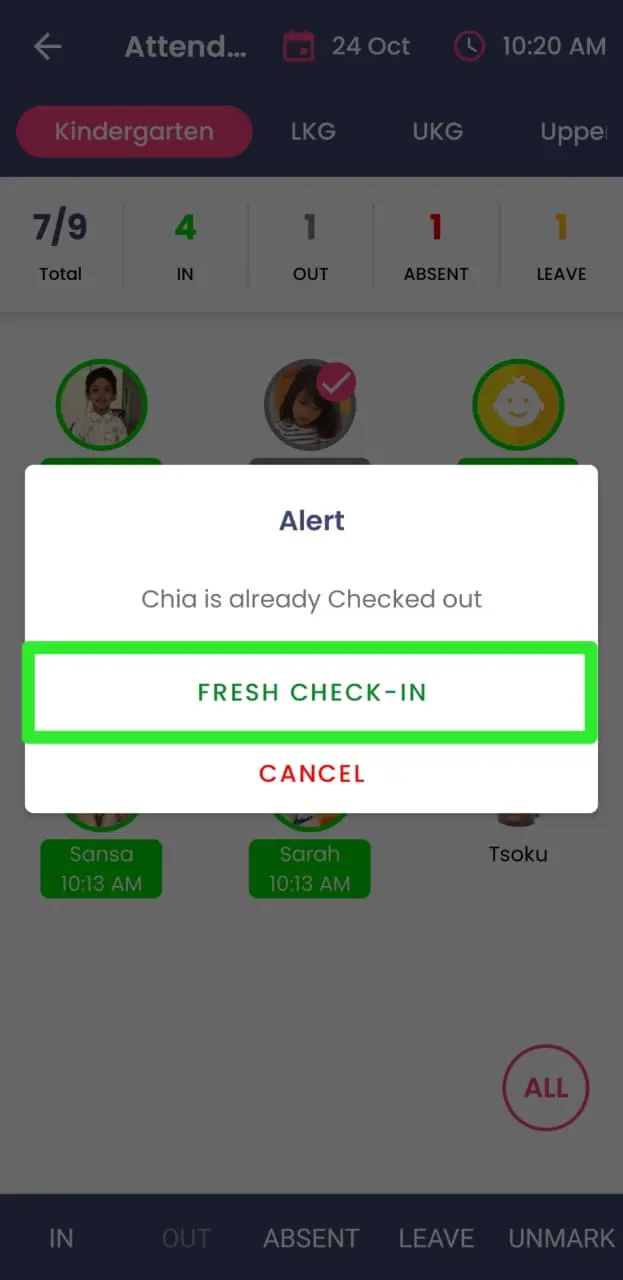
Can teachers and students check in and out multiple times in a day?
Yes. Kriyo supports multiple check-ins and check-outs in a single day — ideal for preschools or daycare centers with half-day or extended sessions.
Every check-in/out is timestamped, visible in reports, and automatically shared with parents in real time.
Tap on the child's photo in attendance and select the “Fresh Check-in” option in the pop-up.
Why am I unable to go back from the QR Check-In screen?
The screen may be locked to prevent accidental navigation — typically used in self-check-in kiosk setups.
Just tap the pink Lock icon, enter your phone password, and the screen will unlock.
What is the purpose of the lock icon in the QR Check-In screen?
The lock icon is designed for self-check-in kiosk setups where parents, students, or staff can scan QR codes.
When enabled, it locks the screen so users cannot access any other features in the app.
To exit, tap the lock icon again and enter your phone password.
Do I need to buy a QR scanner to mark attendance using Kriyo QR codes?
No. You don’t need to purchase any external QR scanner.
Kriyo’s built-in camera-based QR scanner works seamlessly on your mobile or tablet, letting you scan QR codes instantly without any additional hardware investment.
What is the difference between Staff QR Code and GPS Attendance QR Code?
Staff QR Code
- Each staff member gets their own unique QR code
- Anyone at school (like an admin or coordinator) can scan this code to mark that staff member’s attendance.
GPS Attendance QR Code
- There is one common QR code for the entire school.
- Each staff member must scan this code from their own Kriyo app to mark their attendance.
- This QR code is generated only when GPS-based (geofencing) attendance settings are enabled.
📍 In short: Staff QR Codes are individual; the GPS Attendance QR Code is shared and location-based.