How to Manage Two-Way Communication with Parents in Kriyo?
Kriyo's Diary is designed to give schools complete control over how they communicate with parents.
By default, all Diary updates are one-way — meaning parents receive information but cannot respond. This keeps announcements structured and distraction-free.
However, whenever interaction is needed, schools can instantly turn on Two-Way Communication with just a few clicks.
Once enabled, parents can like and comment on the post — creating an experience similar to a Facebook wall. The difference? This is a private, school-controlled environment:
- Only selected parents can see the post
- No external visibility
- No exposure of contact details
- No group chat clutter
It combines engagement with structure — without compromising privacy or data security.
Even more powerful: schools can decide whether one parent's comment should be visible to other parents or remain private to the school. This level of flexibility ensures engagement without losing control.
What Makes Two-Way Communication Powerful?
With Two-Way Communication enabled, schools can:
- Share photos, videos, and updates
- Allow parents to like posts
- Enable comments where appropriate
- Control who sees whose comments
- Decide which staff members receive notifications
This gives schools the freedom to engage parents meaningfully — while maintaining professional boundaries.
Step 1: Create a Diary Update
Open Diary → Select students → Choose communication type → Add your message and attachments.
Before tapping Send, you'll see communication settings.
.webp)
Step 2: Enable Two-Way Communication
By default, Diary posts are one-way. If you want parents to interact with a specific update, switch ON Two-Way Communication before sending.
This allows parents to like and comment on the post.
If you're comfortable with parents seeing each other's likes and comments, select the option that enables shared visibility.
Two-way communication must be activated separately for each post where engagement is required, giving you full control over when interaction is allowed.
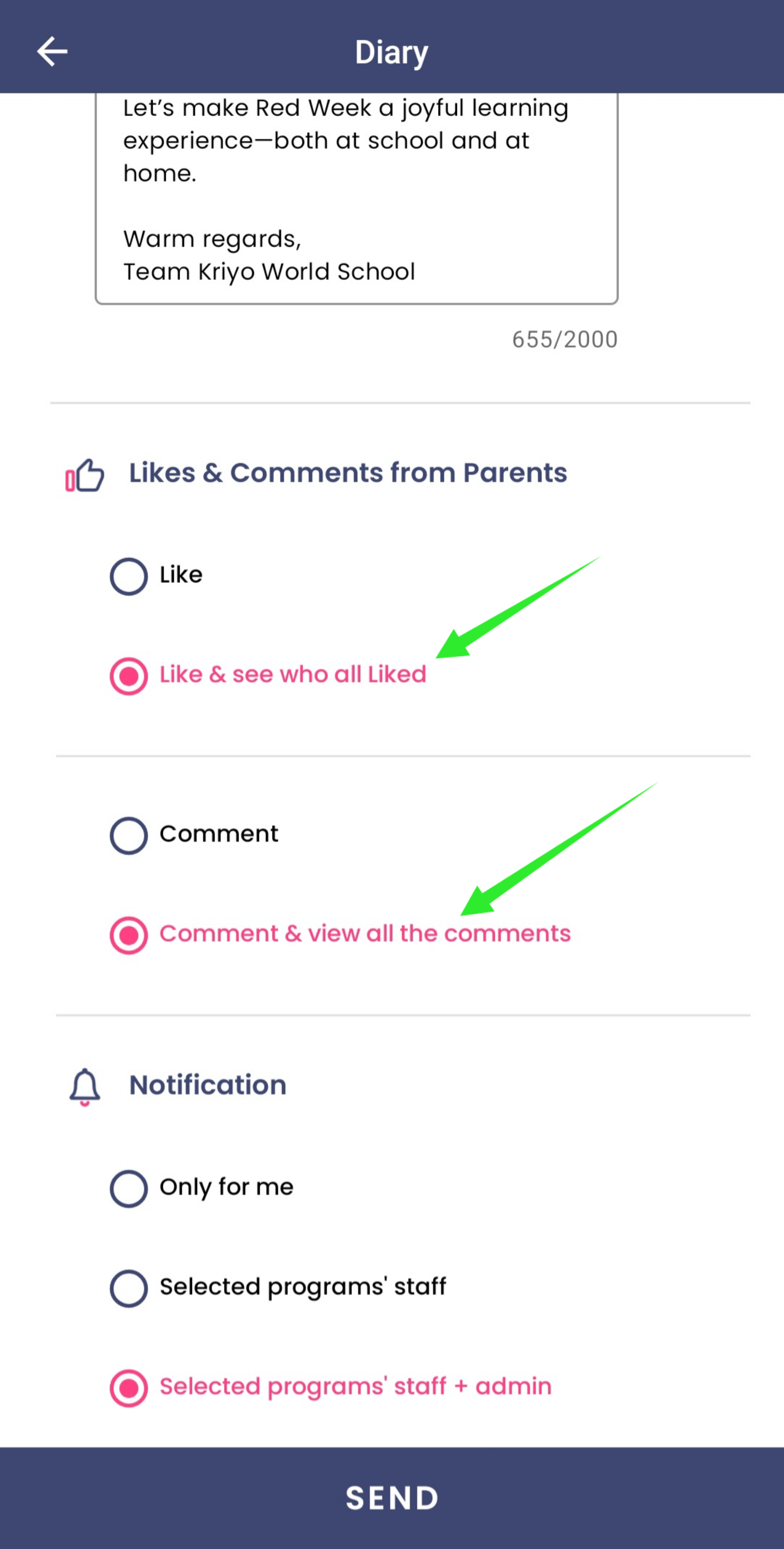
Step 3: Control Comment Visibility
Kriyo allows you to choose how parent comments behave:
- Private Mode – Each parent's comment is visible only to school staff
- Parents cannot see each other's responses
This prevents unnecessary discussions between parents while still allowing them to respond.
.webp)
Step 4: Choose Who Gets Notified
You can define who inside the school should receive notifications when parents comment:
- Admins
- Assigned program staff
- Selected users
This ensures responses are never missed.
When Should Schools Use Two-Way Communication?
Two-way communication works best for:
- Event confirmations
- Activity celebrations
- Engagement posts
- Quick clarifications
For formal circulars or policy announcements, one-way communication may be more appropriate.
Key Points to Remember
- Two-way communication is OFF by default
- It must be enabled per post
- Parents' contact details remain private
- Comment visibility is fully controlled by the school
- Notifications ensure accountability
- The environment is secure and accessible only to selected recipients
Kriyo's Two-Way Communication gives schools the best of both worlds:
Engagement like social media — Control like a professional school system.
You decide when parents can respond, what they can see, and who in your team handles the interaction.
Secure. Flexible. Structured.