How do parents communicate with the school in Kriyo?
Parents can easily communicate with their child’s school using the Write to School feature in the Kriyo Parent App. This provides a single, organised place to send queries, share updates, and attach required documents — without needing WhatsApp, emails, or phone calls.
Here’s how it works:
- Open the Write to School section
- Send a new message or request
- Type your message and attach supporting files
- Photos or Photo IDs
- Documents
- Voice messages
- Send the message
- Receive school responses and continue the conversation
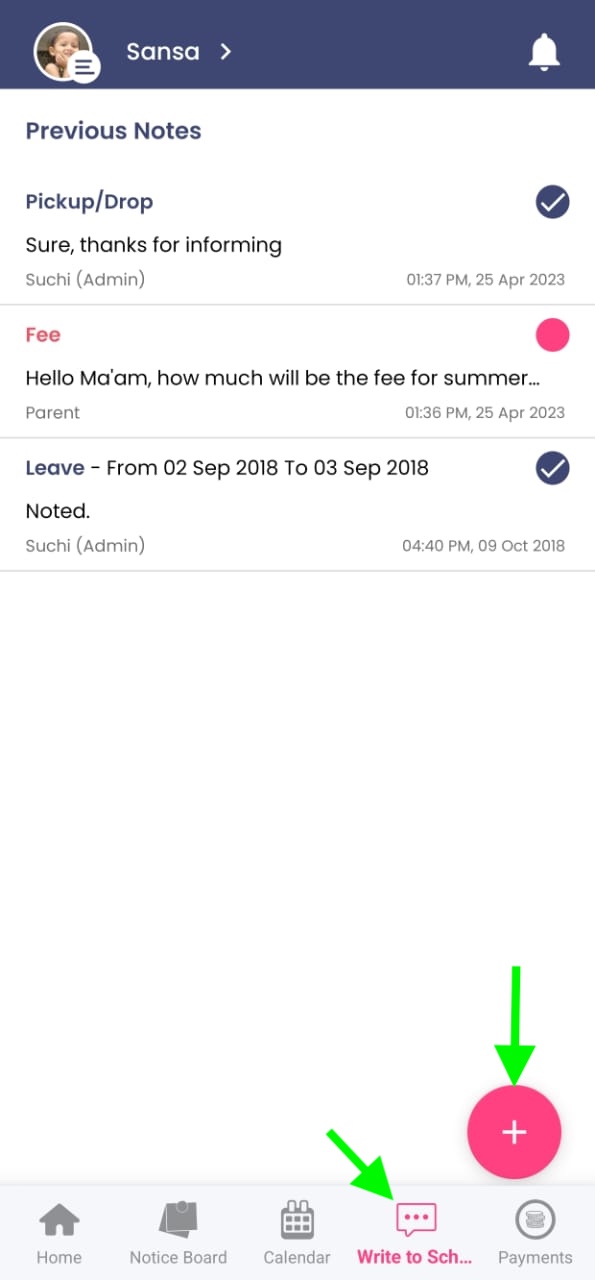
Open the Kriyo Parent App and tap on Write to School, which is the fourth option on the bottom menu.
Here, you will see all previous conversations between your family and the school. Every message sent by you, your spouse, or any other linked family member will appear in the same space, keeping communication organised.
To send a new note, tap on the pink “+” (plus) button at the bottom-right corner.
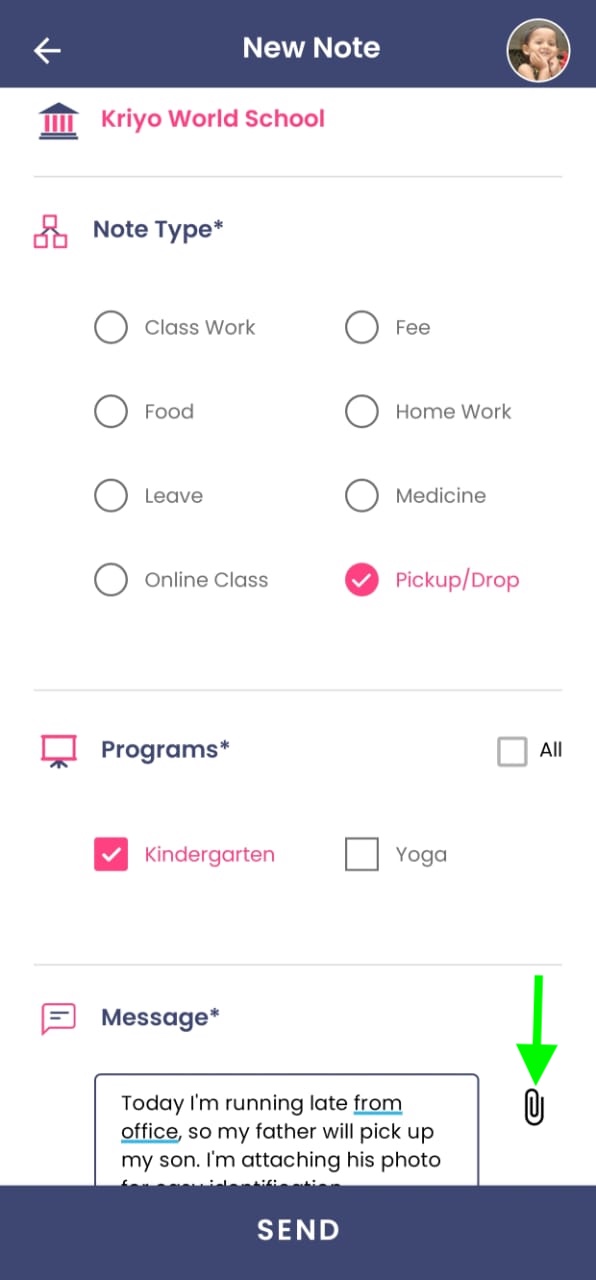
You will now see a list of note types — such as leave request, pickup/drop update, homework query, health-related message, and more. Choose the note type that best matches your request.
If your child is enrolled in multiple programs (for example, preschool + daycare), select the program relevant to your message. This ensures the right teachers and staff receive your note instantly.
Write your message clearly.
For example:
“Today I’m running late from office, so my father will pick up my son — I’m attaching his photo for easy identification”.
You can attach:
This helps avoid confusion and replaces the need for visitor ID cards or printed documents.
If the exact note type you need is not available, choose the closest one and request the school to add the appropriate type for future use.
Tap Send.
Immediately, all authorised school staff assigned to that program will be notified. Since multiple staff members receive the alert, your request does not depend on one person being available at that moment.
Once any staff member reviews and responds to your message, you will receive a notification in the parent app.
You can reply again in the same thread if you have follow-up questions. There is no limit — the conversation can continue until your query is fully resolved.
Using Write to School, parents can communicate quickly, safely, and reliably with their child’s school — all in one place, without switching between multiple apps or sharing personal phone numbers.
Stay Connected With Your Child’s School, Effortlessly
Experience organised, secure, and real-time communication with Kriyo’s Write to School feature.

Stay Connected With Your Child’s School, Effortlessly
Experience organised, secure, and real-time communication with Kriyo’s Write to School feature.