Share Media FAQs
Quick answers to 11 common questions. Pick a question to jump to its answer.
What is the Share Media feature used for in Kriyo?
Kriyo’s Share Media feature allows schools to securely share photos, videos, and albums with parents. It helps teachers send classroom moments, event highlights, and activity updates in an organised gallery that parents can easily access and download.
Is there any limit on the number of photos or videos that I can share?
There is no overall limit on the number of photos or videos you can share in Kriyo. However, at one time you can share:
- Up to 50 photos, or
- One video up to 50 MB
You can send as many batches as needed, so there is effectively no restriction on total media shared.
Are photos and videos shared through Kriyo secure and private?
Yes. All photos and videos shared through Kriyo are secure and private. Parents only receive media tagged to their own child or shared with their child’s program. Teacher and parent phone numbers are never exposed, ensuring privacy for both.
Can children across different classes be tagged in the same photos or videos?
Yes. Kriyo allows teachers to tag children from multiple classes or programs in a single upload.
This is especially useful for group activities, combined sessions, or multi-age events — where children from different classes are part of the same moment.
Teachers can tag only the relevant children, ensuring:
- Parents receive only relevant media
- Privacy is maintained
- No duplicate uploads are needed
For group photos, you can also use the “All” option within a class.
- One upload.
- Accurate tagging.
- Effort saved.
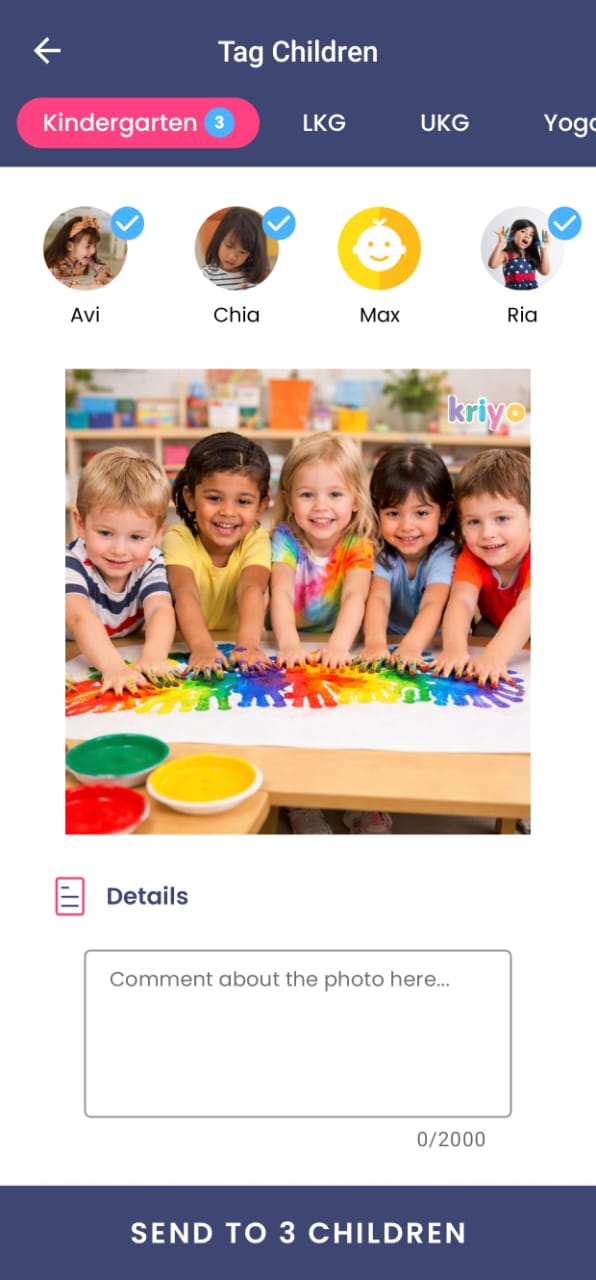
Can I send photos or videos to children from different classes?
Yes. After selecting the photo or video, you can choose children from different classes by tapping the program names at the top. Kriyo allows cross-program tagging to make sharing easier for teachers.
Can schools add watermarks or logos to the photos shared with parents?
Yes. Schools can enable watermarking to add their logo or branding on all photos shared with parents. This helps maintain brand visibility even when parents download or share the photos with others.
How can I configure or modify watermark settings in Kriyo?
Go to Admin Tools → Configurations → Watermark Settings on Kriyo Web to configure your watermark. Here you can:
- Upload your school logo (max 256 KB)
- Choose the display size (e.g., 100 px, 150 px, or actual size)
- Select the position on the photo (top/bottom left or right)
- Preview how the watermark will appear
- Save your settings
All photos and albums shared after saving the settings will automatically include your school watermark across Diary, Photos, and Albums.
What is the difference between sharing photos or videos and sharing albums?
Photos and videos can be shared with specific children based on who appears in them.
Albums, however, are designed for program-level sharing—perfect for events like Sports Day, Annual Day, or festivals. Teachers can add many photos to an album, and administrators can review and publish it when ready.
Can albums be shared with individual children?
No. Albums can be shared only class-wise or program-wise, not with individual children. If you want to share media with selected children, use the Photos or Videos option.
Can teachers edit or remove photos in an album before it is shared?
Yes. Teachers can add photos to the album, and administrators can review, remove photos, or rename the album using the three-dot menu before sharing it with parents.
Will parents be notified when new photos are added to an existing album?
Yes. Parents will be notified when new photos are added to an album. They will not receive notifications if photos are removed.